The BendBoss conduit bending app
BendBoss is a conduit bending calculator for electricians that runs on iPhone, Android and computers. It covers 15 bend calculations, takes measurements on a glove-friendly fraction keypad, and shows every result in tape-measure sixteenths with a diagram and step-by-step instructions. It costs $25.00 once — no subscription, no ads, no account.
The 15 calculators
- Offset — marks + shrink, any angle
- Matching Bends Offset — second bend lands on an exact spot
- Matching Centers Offset — offset centered on a mark
- Rolling Offset — rise + roll, roll angle included
- 3-Point Saddle — 45° center, 22½° sides
- 4-Point Saddle — flat top for wide obstructions
- 90° Stub-Up — take-up for your bender
- Kick — one bend off a 90
- Matching Bend Kick — kick bend on an exact spot
- Matching Center Kick — kick centered on a mark
- Parallel Offsets — every run's marks, spacing kept true
- Parallel Runs — Spacing — mixed conduit sizes in one rack
- Parallel Kicks — a rack of kicks, back or forward
- Compound 90° — two-bend 90 around an obstruction
- Segmented 90° — big-radius sweeps in equal shots
Also in the app
- Stick Layout — several bends on one stick (90s, offsets, 3-point saddles, kicks). Every mark comes back measured from the same end, with shrink and gain figured, plus the cut length for your stock stick.
- Conduit Fill — the NEC Chapter 9 fill check: add every conductor, mixed sizes and insulation types, grounds included, and compare against the Table 1 limit for your conduit's Table 4 area.
- Bender Specs — the built-in benders with their published numbers and sources, plus your own benders saved on your phone.
What's in every calculator
- Fraction keypad — whole inches plus 1/16″ fraction keys, big enough for gloves. No sliders.
- Tape-ready answers — marks in sixteenths, measured from the end of the conduit.
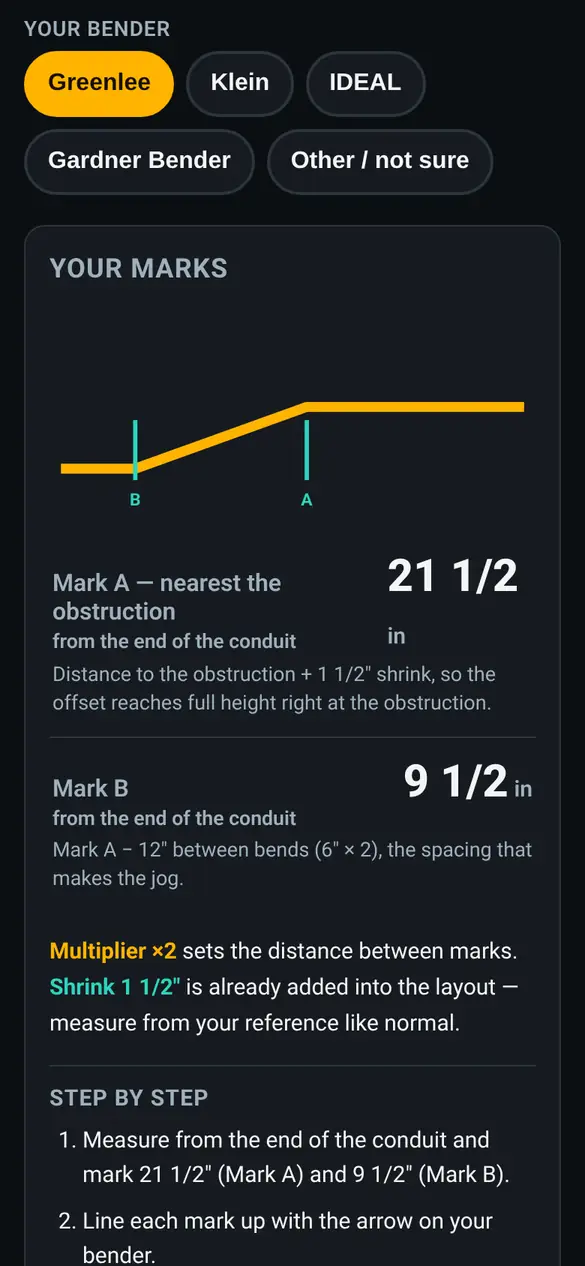
- A one-line “why” under every result — for example, “distance to the obstruction + 1 1/2″ shrink” — next to the full step-by-step math.
- Shrink and multiplier labeled separately, with the shrink already added where it belongs.
- Bend diagrams and step-by-step walkthroughs, plus warnings when a bend won't fit the shoe.
- Pick your bender — Greenlee, Klein, IDEAL or Gardner Bender. The app uses that maker's published take-up and its bend order where the makers' guides differ. If a maker doesn't publish a take-up for a size, the app says so and uses the standard value — check the number on your shoe.
- Your own benders — save your own take-up and radius; they plug straight into Stub-Up and Stick Layout.
- English and Spanish — switch with one tap.
How you get it
- Pay $25.00 once through PayPal.
- PayPal sends you back to your install page.
- Open the app and add it to your home screen: on iPhone, Share → “Add to Home Screen”; on Android, Chrome's “Install app.”
- Open it once while you have signal. After that it works offline — basements, tunnels, dead zones — because the app is saved on your phone.
What it doesn't do (yet)
- Built-in take-ups are for EMT hand benders. Rigid and IMC use the same bend math, but enter your own bender's take-up.
- No PVC heat-bending, no mechanical or hydraulic bender charts in this version.
- It's a calculator, not a code book — check radius and support rules against the NEC and your inspector.
Common questions
Is BendBoss on the App Store or Google Play?
No. It's a web app you install from this site: buy it, open it in Safari or Chrome, and add it to your home screen. It runs full-screen like any other app.
Does BendBoss work without signal?
Yes, after you open it once with a connection. The app saves itself on your phone and every calculator works offline.
Is it a subscription?
No. $25.00 once. No subscription, no ads, no in-app purchases. Updates download in the background when you're online.
Does it work in Spanish?
Yes. The app and this website are in English and Spanish.